
 Tiller Money / Best for Spread...
Tiller Money review: Designed for those who prefer a spreadsheet-based budgeting and financial planning approach, it offers a unique blend of customization and automation with no annoying ads.
What Is Tiller Money?
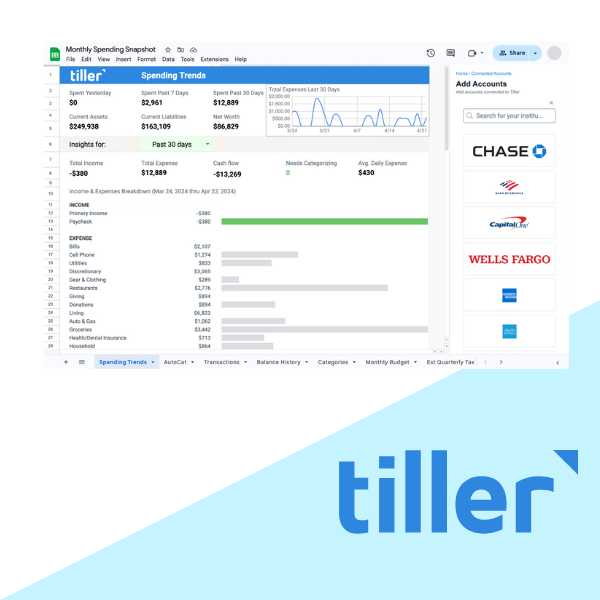
Tiller Money is a financial tool that automatically imports your financial transactions and balances into customizable Google Sheets and Microsoft Excel spreadsheets.
How Tiller Money Works
By combining the flexibility of spreadsheets with automated data feeds, Tiller empowers users to take control of their finances while providing a highly customizable experience. This is how it works:
- Connect Your Accounts: Securely authenticate your accounts in Tiller’s Console.
- Link Your Spreadsheets: You can connect your accounts to both Google Sheets and Microsoft Excel at the same time.
- Import Your Transactions: All your spending, income, and transfers flow into a unified transactions sheet.
Key Features
- Automated Data Feeds: Automatically sync transactions and balances from over 21,000 financial institutions.
- Customizable Spreadsheets: Use pre-built templates or create your own personalized financial spreadsheets.
- Daily Email Updates: Get a daily email summary of your latest transactions and balances.
- Privacy and Security: Bank-grade security with no ads and no selling of customer data.
- Collaboration Tools: Share your spreadsheets with family members, partners, or financial advisors.
- Integrations: Works seamlessly with Google Sheets and Microsoft Excel.
- Financial Templates: Access a library of templates for budgeting, expense tracking, debt reduction, and more.
Pricing
- Annual Plan: $79 per year (equivalent to $6.58 per month).
Tiller provides a 30-day free trial, allowing users to explore its features before committing to a subscription.
Tiller Money Pros & Cons
Pros
- Provides unmatched flexibility through spreadsheets, allowing users to tailor financial tracking to their needs.
- Saves time by syncing transactions and balances automatically.
- Easily share financial data with partners or advisors.
- Offers pre-built templates for a variety of financial tasks, reducing setup time.
- No ads or data selling, ensuring your financial information remains secure.
Cons
- Requires users to be comfortable working with spreadsheets.
- Lacks a dedicated mobile app.
- New users may need time to familiarize themselves with spreadsheet functionality and templates.
Who is Tiller Money Best For?
Tiller Money is ideal for users who prefer working with spreadsheets but want to avoid the hassle of manual data entry.
How to Get Started
Getting started with Tiller Money is straightforward:
- Sign Up: Visit the website and start a 30-day free trial.
- Link Your Accounts: Connect your bank accounts, credit cards, and loans to sync transactions and balances automatically.
- Choose a Template: Select from Tiller’s library of financial templates or create your own spreadsheet.
- Customize Your Sheets: Personalize your spreadsheet to suit your specific financial goals.
- Monitor Daily Updates: Review your daily email summaries and regularly update your spreadsheet as needed.
Tiller Money Review: Best for Spreadsheet Lovers
Tiller Money is a legitimate app and not a scam. It has a high rating of 4.5 in the Microsoft AppSource, with customers raving about great support and ease of budgeting using spreadsheets.
Our Tiller Money review offers a unique solution for users who love spreadsheets but hate manual data entry. Its combination of automation, customization, and privacy makes it a standout choice for managing personal finances. However, the lack of a mobile app and reliance on spreadsheets may not suit everyone. If you don’t like spreadsheets, this isn’t the budgeting tool for you.
While it lacks a free version, the annual price is competitive for users who value its unique automation and customization features. With a 30-day free trial, you can explore Tiller’s features risk-free.
Tiller Money Alternatives
If Tiller app doesn’t suit your needs, consider these alternatives:
- YNAB: Ideal for those who prefer zero-based budgeting and an active community.
- Simplifi: A user-friendly app with spending insights and customizable budgeting. Get Simplifi.
- Empower: Offering robust wealth management tools alongside free budgeting features. Get Empower.
- Goodbudget: Envelope-based budgeting with a free plan and premium options.
We appreciate your honest feedback. Share your real experience to help others make confident money decisions.




Reviews
There are no reviews yet.